Monday, December 3, 2007

HP ZD7000 DC Power Jack Repair


This laptop came in with a broken center pin that was still stuck inside the adapter. Sometimes the pin can be pushed down and the adapter will function properly again. I wasn't able to get this one to budge.
The laptop wouldn't power on but some front lights flashed when I hit the power button.
Once the laptop was torn down the dc jack and motherboard area looked like it had no signs of damage. I de-soldered the old dc jack and replaced it with a new one. After it was all put back together it powered on with no problems.
To test the laptops that come with the hard drives removed I use a linux bootable cd. This lets me test sound, network, and other parts of the laptop.

Gateway 7324/7000 Series DC Jack Repair

I've been seeing a lot of these lately and I don't know if it's the marketing or this model and series is just really problematic to dc jack repair.
It came in with the classic symptom of being able to wiggle the adapter to get the laptop to power on/charge.
The 7000 series use a six pin, 2.5mm style dc jack.
Once I got it all torn down the volatge pin was slightly burnt which explains the wiggle effect. When I got a new dc jack soldered on the laptop is now powering on and charging the battery again.

Dell Latitude D600

When this laptop came in it had no symptoms of a dc jack except the fact the supposedly it worked on battery but stopped charging. When I got the laptop opened up the dc jack had no signs of failure. I always replace the jack regardless of what the jack area looks like in case it has some type of internal failure. On this series of laptops (600m, 500m, D500, D505, D510, D600, D610) I see this same symptom. I replace the jack and it still doesn't charge. It has come circuitry problem on the motherboard but it gives the symptom of a dc jack. I was never able to do the wiggle trick to get the laptop to power on.
The motherboards for a D600/600m run about $120+ shipping on ebay so I was able to obtain a replacement and that fixed the problem. Now the laptop powers on and everything is working fine.

Panasonic Toughbook CF-72

This laptop came in with a physically broken dc jack. It uses the same dc jack as some Sony laptops that suffer from this same problem.
I was very surprised at how easy it was to get this laptop torn down. All you need to do is remove all the screws from the bottom and remove the screws under the battery and the whole motherboard comes out. Now just take out the two screws holding in the motherboard and you're ready to de-solder!
Replacing the jack did the trick and the laptop works fine again.

Sunday, December 2, 2007

Testing/Diagnosing your AC Adapter

Every once in a while a laptop comes in for a dc jack repair and it's simply a bad Ac Adapter. If the wire breaks internally it can give you the symptoms of a dc jack problem.
All you need for this is a simple mulitmeter. You can purchase these from somewhere like Sears or RadioShack.
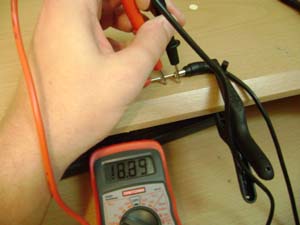
Every AC Adapter has a voltage that it delivers power at. Today I'll be testing a hp adapter that runs at 18.5V. As shown in the picture you want to put the red part of the multimeter directly inside the adapter plug. On this hp adapter the plug size is 1.65mm and will need something like a small screwdriver or paper clip to get inside. Plugs that use 2mm, 2.5mm, and 3mm won't need a paper clip for this to work.
Make sure to set the multimeter to V DC (DC Voltage). Once inserted the multimeter should read close to whatever voltage you AC Adapter is. If it comes up as zero you obviously have a bad ac adapter. In this case the adapter test good at 18.89 volts.

Dell Inspiron B130

The B130 is very similar to and uses the same jack as the inspiron 1000, 1200, 2000, 2200, 110L, 120L, and B120 dell laptops. These jacks are also used in some Acer and Toshiba models as well.
This B130 came in with the symptom of positioning the ac adapter in the right spot to make it charge. Using a small flathead screwdriver I could see the center pin on the jack was very loose.
When the laptop was all torn down the pins on the jack were intact so it was an internal problem with the center pin.
The dc jack was replaced and the laptop now powers on and charges the battery.

Saturday, December 1, 2007

Dell Inspiron 9300 DC Jack Repair

The Inspiron 9300 is very similar to the 6000, 6400, E1505, and E1705 laptops among others. They all fall victim to the dc jack problem and are very common for this repair.
This laptop came in with the symptom of being able to wiggle the jack or position it the right way to make it charge. Dell had already replaced the ac adapter and system board once under warranty. Of course now that the laptop is out of warranty a new system board is pricey and unnecessary.
The laptop was torn down and you could see the two voltage pins had cracked where the solder meets. This gives the laptop the wiggle effect to make it charge.
As always the jack was replaced (could have been re-soldered) and the jack now feels very solid when plugged in. Make sure you add enough solder to the data pin so the motherboard can know what type of adapter is plugged in.