Tuesday, December 6, 2011

Toshiba Satellite L655 DC Power Jack Repair


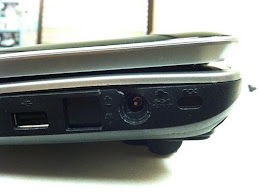
This Toshiba Satellite L655 laptop came in with a very broken power plug. The laptop casing is also cracked so it looks like it took a fall or someone tripped over the ac adapter when it was plugged in. Most of the time we're still able to fix the dc input even though it's been physically damaged.
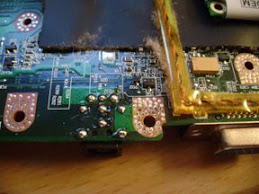
The L655 notebook needs to be completely taken apart to access the dc socket. It uses a cable style dc jack that plugs into the motherboard.
Once inside the plastic housing that holds the dc jack into place is broken along with the dc jack. We installed a brand new dc jack glued it into place with a special glue. It needs to dry for 24 hours but won't break again assuming the laptop isn't abused.
Despite the damage the dc jack was replaced and the laptop works great again!

Dell Inspiron 1525 PP29L DC Power Jack Repair


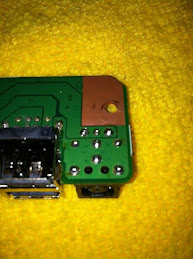
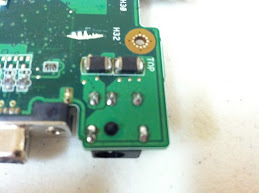
This Dell Inspiron 1525 (PP29L) laptop came in with a very loose dc jack. I couldn't get the laptop to power on by holding the adapter tip but nonetheless very loose. I really like to get then to power up before I do the plug replacement but that's not always the case. The best analogy I can think of is it's almost like a loose tooth. The more you wiggle the worse it will get then eventually break free. If you're experiencing this problem with ANY laptop stop right away. Wiggling the adapter plug to much can damage the motherboard.
The dell 1525 notebook needs to be completely taken apart to access the dc jack. It uses a separate circuit board that attaches to the motherboard. A standard nine pin, barrel style foxconn dc jack is used on this model. It is soldered to that separate board.
When I got down to the circuit board I could see someone had attempted to solder it on their own. It was loosely hanging from the circuit board and looked beat up. In this case we replaced the entire board to ensure a long lasting repair.
Once replaced the laptop powers on and charges the battery again!

Thursday, December 1, 2011

Toshiba A505 DC Power Jack Repair


The Toshiba Satellite A505 series laptops feature the newer Core series cpu.  They are much quicker than the previous generation toshiba notebooks (L505, L305, L355, etc.).
Most of the toshiba A505 notebooks come in with the dc jack pushed back inside the laptop or have a very loose connection.  Looking at the before and after pics it looks like the laptop was dropped or the power cord tripped over.  Normal use won't cause that type of damage to the socket.
They use a cable style dc jack that plugs directly into the motherboard.  The a505 needs to be completely taken apart to the motherboard to access the dc plug for replacement.  No soldering is required for this model unless you want to change just the dc jack tip and reuse the cable.  Due to cost of these jacks I suggest you replace the entire cable assembly.

Dell Inspiron M5030 DC Power Jack Repair

This Dell Inspiron M5030 laptop came in with a loose power plug connection.  When you plug the laptop in to the dc socket it feels very loose and only powers on when you hold it at a certain angle.  If this is happening to your laptop you should STOP right away.  Doing this runs a chance of ruining the motherboard which is a much more costly repair and a lot of the time not worth it due to cost.
The M5030 notebook uses the standard nine pin circular barrel dc jack that dell has been using for years.  The laptop needs to be completely taken apart to access the dc jack.  It's also soldered directly to motherboard so it needs to be de-soldered and a new dc plug soldered back on.
After the jack is replaced the laptop powers on and charges the battery again!

Toshiba L455 DC Power Jack Repair


This toshiba L455 laptop came in with the classic physically broken dc jack on see on many toshiba notebooks. The power plug is pushed back inside the laptop and the power cord won't stay connected properly or at all.
It uses a cable style dc jack that is soldered onto the motherboard but in some cases the dc jack on the end of the cable can be replaced. In other instances the dc connection is fine but the plastic housing that holds the jack into place is what needs to be fixed. In the picture above the jack needed to be glued back into place and the plastic housing fixed.
The laptop needs to be taken apart to the motherboard to access the dc jack and should be performed by a professional.
Once the jack housing is fixed the laptop is put back together and working great!

Monday, November 28, 2011

Toshiba L505-S5990 DC Power Jack Repair


This Toshiba L505 came in with the power plug pushed back inside the laptop. It uses a cable style dc jack that's plugged into the motherboard. On a lot of these toshiba laptops (L305, L355, A505, A305) the plastic housing that holds the power receptacle into place is also broken. We've seen this many times year after year and have a special glue that can hold the jack into place like new again.
The L505 laptops do need to be almost completely taken apart to access the dc jack and replace it.
We put together a step by step guide on how we take the L505 apart and gain access to the broken power socket. You can watch that video at the link provided here toshiba dc jack repair.
Once the jack is replaced the laptop powers on and charges the battery again!

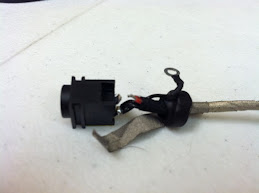
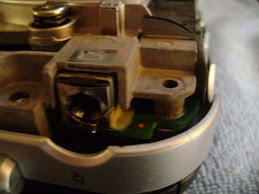
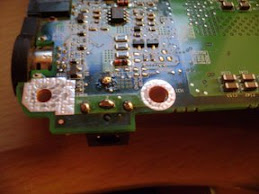
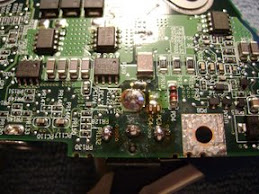
Sony VPCY2/PCG-51412L DC Power Jack Repair


This Sony VPCY2 came in with a physically broken and offset power plug. It was pushed back inside the laptop and was most likely a victim of the owner tripping over the cord and dropping the laptop.
The dc jack is a cable style receptacle that plugs into the motherboard vs. being soldered directly to the board. The dc jack is however soldered to the end of the cable so sometimes we just solder a new plug on and reuse the cable assuming it's not damaged.
The VPCY2 does need to be almost all the way taken apart to access the dc jack and these Sony notebooks aren't the easiest to get apart safely.
Once replaced the Sony powers on and works great!